

Big Dan
EQ Forum Moderator
In addition to having a top notch web interface Gmail is one of the few free webmail providers that allow you to access your mail via POP or IMAP for free.
POP3 (aka POP) and IMAP are two different mail protocols which allow a mail programs like Microsoft Outlook, Microsoft Outlook Express, Windows Mail, Eudora, Mozilla Thunderbird, and pretty much any other mail program to access your mail and allow you to work with your mail in the program. The advantage of this is you're able to access and download you email all in one place and possibly have a backup of your Gmail. More on this later.
IMAP is probably the best way to use Gmail in your client as all changes are synced to the server. Basically this means if you delete an email in Outlook it will be deleted on Gmail's Website too. If you move a message in Outlook it will be moved in Gmail mail too. I'll outline the using IMAP first then explain POP and outline that. For the purposes of this tutorial I'll be showing screenshots of Outlook. Upon request I can add screen shots of other programs.
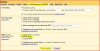
First things Enable IMAP in your Gmail account. You do this by logging into Gmail, Clicking Settings in the top right hand corner > Clicking on the Forward and POP/IMAP Settings > Enable IMAP > Save Changes. Here is a screen shot for you:
Next we'll fire up Outlook and create a new account:
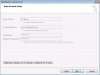
Enter your name, full Gmail address with the @gmail.com at the end, your password, and check the "Manually configure server settings or additional server types" box
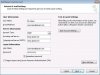
Here your full name and email address should already by entered from the last screen. Select account type: "IMAP" from the drop down type imap.gmail.com for incoming mail server and smtp.gmail.com for your outgoing mail server.
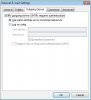
Now click more settings and select the outgoing mail tab. Tick the 'my outgoing server (smtp) requires authentication and the radio button saying 'use same settings as my incoming mail server'
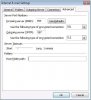
Okay this is the last step in the same window as above select the advanced tab, and select SSL from the Use the following type of encrypted connection drop down. Press okay and your done.
Now you will see a set of folders in your separate from your main Outlook inbox. These folders always stay in sync with Gmail so it make take a good 10 minutes to sync the first time especially if you have lots of mail.
Next up explaining POP access and instructions on how to set it up.
POP3 (aka POP) and IMAP are two different mail protocols which allow a mail programs like Microsoft Outlook, Microsoft Outlook Express, Windows Mail, Eudora, Mozilla Thunderbird, and pretty much any other mail program to access your mail and allow you to work with your mail in the program. The advantage of this is you're able to access and download you email all in one place and possibly have a backup of your Gmail. More on this later.
IMAP is probably the best way to use Gmail in your client as all changes are synced to the server. Basically this means if you delete an email in Outlook it will be deleted on Gmail's Website too. If you move a message in Outlook it will be moved in Gmail mail too. I'll outline the using IMAP first then explain POP and outline that. For the purposes of this tutorial I'll be showing screenshots of Outlook. Upon request I can add screen shots of other programs.
First things Enable IMAP in your Gmail account. You do this by logging into Gmail, Clicking Settings in the top right hand corner > Clicking on the Forward and POP/IMAP Settings > Enable IMAP > Save Changes. Here is a screen shot for you:
Next we'll fire up Outlook and create a new account:
Enter your name, full Gmail address with the @gmail.com at the end, your password, and check the "Manually configure server settings or additional server types" box
Here your full name and email address should already by entered from the last screen. Select account type: "IMAP" from the drop down type imap.gmail.com for incoming mail server and smtp.gmail.com for your outgoing mail server.
Now click more settings and select the outgoing mail tab. Tick the 'my outgoing server (smtp) requires authentication and the radio button saying 'use same settings as my incoming mail server'
Okay this is the last step in the same window as above select the advanced tab, and select SSL from the Use the following type of encrypted connection drop down. Press okay and your done.
Now you will see a set of folders in your separate from your main Outlook inbox. These folders always stay in sync with Gmail so it make take a good 10 minutes to sync the first time especially if you have lots of mail.
Next up explaining POP access and instructions on how to set it up.
Last edited:

 to Email Questions!

