

Hello,
To remove your primary email address from your Facebook account :
To remove your primary email address from your Facebook account :
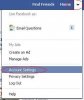
- Go to the top right, click the arrow and select Account Settings
- Click the Edit link to the right of your email settings
- Click the link for "add another email"
- Save the changes, confirm the email address.
- Go back to your email settings and click the radio button next to the new email address
- Save the changes.
- Now you can click the remove link next to your old primary email address
- Save the changes to get the original primary email address removed from the account.

