Email Questions  
     

Left Nav Register Home Forum Search Today's Posts Mark Forums Read Right Nav

Left Container Right Container
 

Go Back   Email Questions » Email Forums » Email Program Setup and Configuration » Outlook Express


Outlook Express Microsoft Outlook Express email questions

Can not open links with Outlook Express

Outlook Express


Reply
 
LinkBack Thread Tools Display Modes
Old Saturday, November 22nd, 2008   #1
Postmaster
 
popowich's Avatar
 
Join Date: Aug 2008
Location: Rochester, NY
Posts: 2,543
Thanks: 234
Thanked 306 Times in 288 Posts
Default Re: e-mail links

Hello,

Are you having a problem opening email links in Outlook Express?

I have seen this happen when an unexpected program makes itself the default web browser on your computer.

The first thing to check is Internet Explorer:
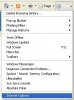
  • Open Internet Explorer
  • Go to Tools and select Internet Options
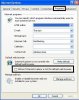
Can not open links with Outlook Express-internet-explorer-internet-options.jpg
  • Go to the Programs tab and check the option for IE to do a default browser check the next time it starts
Can not open links with Outlook Express-internet-explorer-default-browser-check.jpg
  • Click Apply and then OK.
  • Close all Internet Explorer browsers and then Start Internet Explorer.
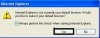
  • Say Yes and make Internet Explorer your default web browser.
Can not open links with Outlook Express-internet-explorer-make-ie-default-browser.jpg
  • Close Outlook Express and start it back up.
Another possibility is that Outlook Express is configured to read e-mail in plain text:
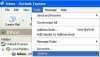
  • Open Outlook Express
  • Go to the Tools menu and select Options
Can not open links with Outlook Express-outlook-express-tools-options.jpg

  • Go to the Read tab
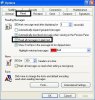
  • Uncheck the box for read all messages in plain text
Can not open links with Outlook Express-outlook-express-read-messages-plain-text.jpg

  • Click Apply and then OK
  • Restart Outlook Express

Lastly, a third option to try if the above two fail is within the Outlook Express Security Options:
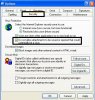
  • Open Outlook Express
  • Go to the Tools menu and select Options
Click image for larger version

Name:	Outlook Express - Tools Options.JPG
Views:	2
Size:	19.8 KB
ID:	291

  • Go to the Security tab
  • Uncheck the box for do not allow attachments to be saved or opened if they could potentially be a virus
Can not open links with Outlook Express-outlook-express-dangerous-attachments.jpg
  • Click Apply and then OK.
  • Restart Outlook Express.
Please let us know if any of these solutions were the fix to your problem. Thank you.

-Raymond

popowich is offline  
Digg this Post!Add Post to del.icio.usBookmark Post in TechnoratiFurl this Post!twitter
Reply With Quote


Reply

Tags
links, open, outlook express

Thread Tools
Display Modes


Similar Threads
Thread Thread Starter Forum Replies Last Post
What is the path to outlook express? yukon Outlook Express 1 Saturday, April 10th, 2010 07:45 AM
How to migrate contacts from Microsoft Outlook and Outlook Express to Gmail popowich Gmail 0 Tuesday, December 16th, 2008 07:55 PM
i need help with outlook express Ashley Help Desk 1 Thursday, December 4th, 2008 10:01 AM
can not open e-mail links lizzy Outlook Express 3 Monday, November 24th, 2008 11:56 AM
Outlook Express popowich Full Email Headers 0 Friday, November 7th, 2008 09:25 AM


All times are GMT -4. The time now is 08:56 AM.


Powered by vBulletin® Version 3.8.5
Copyright ©2000 - 2010, Jelsoft Enterprises Ltd. SEO by vBSEO 3.3.2