

Hello,
To change the default font used when composing a message in Outlook Express:
To change the default font used when composing a message in Outlook Express:
- Open Outlook Express
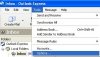
- Go to the Tools menu and Select Options
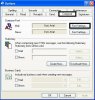
- Select the Compose Tab, and push the Font Settings button to change the default font
- When you are done push the OK buttons to close the settings windows.
