Email Questions  
     

Left Nav Register Home Forum Email Directory Email Marketing Search Today's Posts Mark Forums Read Right Nav

Left Container Right Container
 

Go Back   Email Questions » Email Forums » ISP and Free Email Support Forums » Gmail


Gmail Gmail email questions

How to use Gmail Audio and Video Chat

Gmail


Reply
 
LinkBack Thread Tools Display Modes
Old Sunday, November 16th, 2008   #1
Postmaster
 
popowich's Avatar
 
Join Date: Aug 2008
Location: Rochester, NY
Posts: 5,070
Thanks: 667
Thanked 519 Times in 487 Posts
Default How to use Gmail Audio and Video Chat

Hello,

Would you like to enable Gmail audio and video chat?

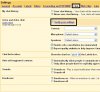
To get started please follow these steps:

How to use Gmail Audio and Video Chat-gmail-settings.jpg

  • Select the Chat tab and verify/test your camera, microphone, and speaker selections
How to use Gmail Audio and Video Chat-gmail-verify-chat-settings.jpg
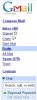
  • Go to the chat section of your Gmail.
How to use Gmail Audio and Video Chat-gmail-chat.jpg
  • If a contact has a camera icon next to their name click Video & More to make a voice or video call to them
  • When a contact receives a call from you they will hear a ring on their computer.
__________________

Register today to ask an email question in our email forums!
popowich is offline   Reply With Quote


Reply

Tags
audio, chat, gmail, gmail audio, gmail chat, gmail video, video

Thread Tools
Display Modes


Similar Threads
Thread Thread Starter Forum Replies Last Post
Gmail Video Chat Rochester brutha Help Desk 1 Sunday, November 16th, 2008 01:10 AM


All times are GMT -4. The time now is 07:07 AM.


Powered by vBulletin
Copyright ©2000 - 2013, Jelsoft Enterprises Ltd. SEO by vBSEO