

Hello,
The following is a quick guide on how to hide the recipients of an using BCC for Gmail members :


For more tips and help with Gmail please visit our free Gmail Help forum.
-Raymond
The following is a quick guide on how to hide the recipients of an using BCC for Gmail members :
- Start a new email by clicking Compose Mail :
- Click the Add BCC link :
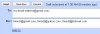
- Send the email to yourself and type the rest of the recipients in the BCC box :
- Compose the rest of the message as normal with a subject and body and then send.
For more tips and help with Gmail please visit our free Gmail Help forum.
-Raymond

